Showing posts with label Digital Art. Show all posts

Thursday, October 24, 2013

Spooky Halloween Trees: Art for Primary Children


Here is a quick halloween activity
 for primary students.


Firstly, grab some A3 paper in white or yellow. 
Blue could work nicely too.
Find a circular object and trace around it to make the moon.

We discussed that a centred moon
 does not make a terribly interesting composition.
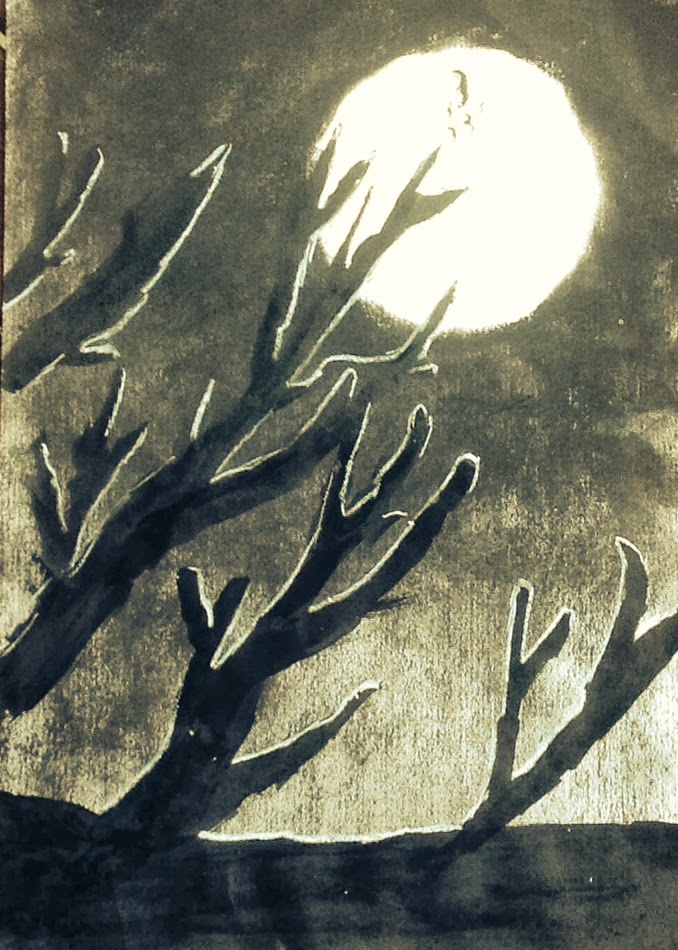


Now for the fun... charcoal experimentation!
Students were challenged to try using their charcoal sticks
from all angles and create all manner of marks.
This gets a lot of their system as well as being fruitful.

Then I demonstrated how to create variety of tone
 by varying the pressure, using smudging etc. 
They filled in the background, except the moon.

Ink time!
Brushes, nibs, sticks.
More experimentation time.
When it was time to move on,
they used ink to create a tree.

Trees always look easy peasy,
 but actually can be quite challenging for some.
Its important to discuss overlapping,
and the change in the thickness as the tree branches out.


 Many students just put the tree to one side,
 but I like the way this student is playing with position and composition.


Finally, an introduction into light sources.

Turning the fluros on and off in the classroom
and noting how it changes the light on our faces and the objects around us.

We noted that in our spooky pictures

the moon was our light source.
We used a waxy white pencil and simple lines to highlight the branches and trunk of the tree.


A simple line on the underside or top side of the branch
 was all that was required to make the trees extra spooky.


What else?

Add a eerie bird. 
Take a photo of the image and play with filters.
Create a new foreground.
Or, simply put it up for halloween!


Boo everybody!


Sunday, September 23, 2012

ipad drawing lesson for students and adults

The Background:
 ipad drawing apps are plentiful.
They interest me for both my personal work and my high school teaching.
This is what I have been doing and am now teaching to my Yr 8 classes.

I use Sketch Book Express with the students- but Sketch Book Pro is worth the $1.


To Begin:
It is pretty simple to begin with a line drawing like Twiggy.
In the first lesson or two I get the students to use a specific pencil (no 4) 
and then they practice brush shortcuts.
"Just play with variation of thickness and opacity".


App + App = image development:
Filter Apps like Instagram, Camera Bag and my favourite BeFunky allow students to manipulate their saved image. Through these simple apps they make visual choices regarding cropping, saturation, frames, filters and more.
The students now have two images and are building up a portfolio.


A Step Further - Using screen shots and Layers:
Once you have a basic line drawing - you can add a layer.
Here I simply took a screen shot of a 1960s fabric and imported the photo as a new layer.

I erased parts of the fabric layer so that my 1960s woman was visible underneath.

A Third Layer- Colour:
SB Express is limited to 3 layers- SB Pro has 5 layers- much better!
So now with the hair I have added a third layer on the bottom for my colour.
 Having the drawing layer, the screen shot layer and colour layer separate is really important.
 When teaching this to a class, the students need to be aware all the time WHICH layer they are working on.
 The benefit of adding colour onto a separate layer?
Students can delete the layer if it isn't working.


So here we are - almost finished.
Once again, export the image to the photo library
 and extend the image by employing filter apps to manipulate the image. 
When teaching this is a great opportunity to have discussions
 about what is successful and why?


In the classroom- some points:
  • Get the students to 'save a copy' regularly during the process as Sketch Book doesn't have this feature in built. 
  • For younger classes and classes lacking confidence begin with a screen shot of an image and trace over the image on a second layer. One class I am working with began with screen shots and photos of a still life. Then they traced over these images - this engages all students extremely well, they don't fail and their confidence improves- BAM!


This is all pretty new to me and I am learning still.
What I do know is that ipads and tablets are now part of education
and the way I see it they are extremely applicable in Art.
 I love the potential, it is exciting don't you think?

It is also an addictive introduction for students into the power of digital apps and the further potential of more powerful software such as Adobe Photoshop and Illustrator.

I am so interested to hear what anyone else is doing in this area.
Do you have a favourite drawing app?
What is your favourite filter app?

My user name on Instagram is elleandlou